 Comparely
Website Migration Testing
See exactly what breaks when you migrate
One-click capture or full migration comparison — check page existence, content accuracy, and visual fidelity between source and target sites. Native desktop app or browser, your choice.
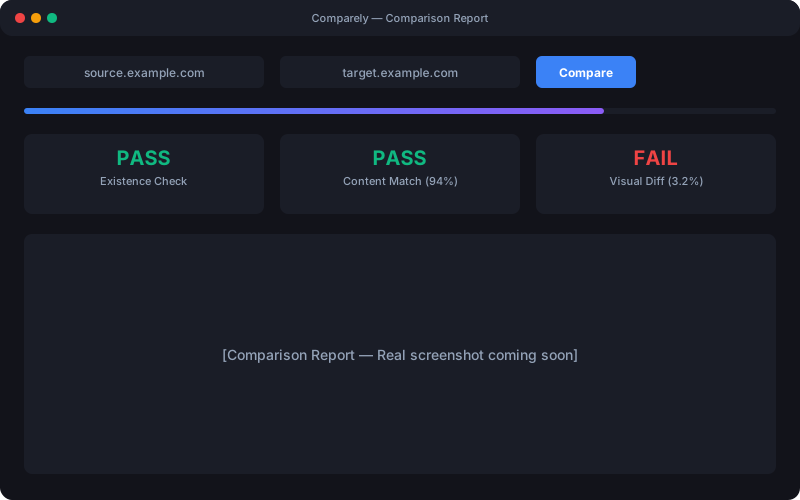
Comparely is a free desktop application for website migration testing. It compares a source site against a target site across three dimensions: page existence (HTTP status codes and broken redirect detection), content accuracy (titles, headings, meta descriptions, and body text with a 90% word-overlap threshold), and visual regression (pixel-level screenshot comparison with a configurable diff threshold, defaulting to 0% for pixel-perfect matching). Available on macOS, Windows, and Linux as a desktop app, plus a browser-based web version, Comparely processes pages in batches of 50 and generates interactive reports with pass/fail breakdowns, content diffs, and side-by-side screenshot viewers.
The Problem
Website migrations break things
Every replatform, redesign, or domain change risks breaking pages, losing content, and introducing visual regressions.
Pages vanish
Broken redirects, missing pages, and unexpected 404s slip through manual QA and damage SEO rankings.
Content drifts
Titles, headings, and body text get altered or lost during migration. Small changes compound into big problems.
Layouts break
CSS changes, missing assets, and rendering differences create visual regressions that are hard to spot manually.
How It Works
Three steps to verified migration
Enter your URLs, run the comparison, and get a detailed report in minutes.
Enter URLs
Enter your website URL and hit Start for an instant screenshot — or tap + to set up a full comparison with target URL, page limits, and visual threshold.
Compare
Choose which pages to test, then watch as Comparely checks existence, content, and visuals with live progress and pause controls.
Review
Get a detailed report with blame indicators, side-by-side screenshots, content diffs, and smart diagnosis for bulk failures.
Features
Three dimensions of comparison
Every migration check you need, in one tool.
Existence Check
Never miss a broken page
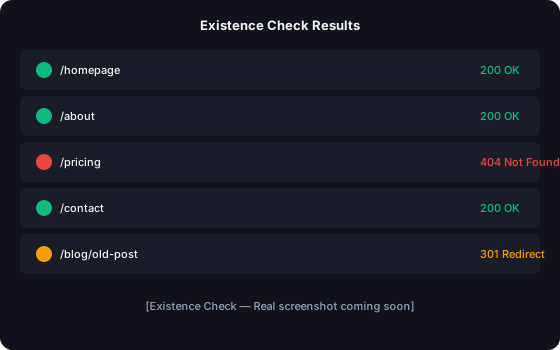
HTTP status checks across every page on source and target. Catches 404s, broken redirects, authentication walls, and server errors before your users do. Blame indicators show which site returned errors (e.g., "200 → 404") so you know exactly where the problem is.
Content Comparison
Detect every content drift
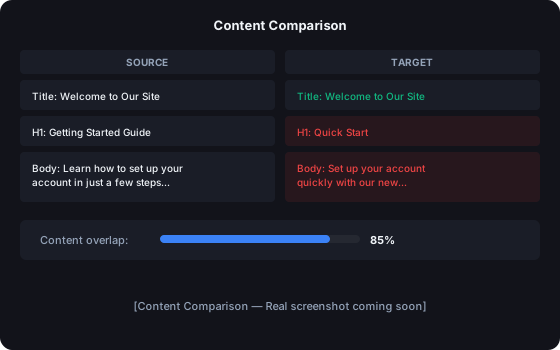
Compares titles, headings, meta descriptions, and body text with a 90% word-overlap threshold. Surfaces exactly what changed, what's missing, and what was added.
Visual Regression
Pixel-perfect visual proof
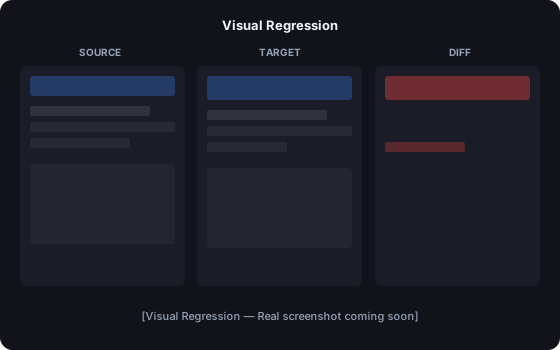
Full-page screenshots compared pixel-by-pixel with a configurable threshold (defaults to 0% for strict pixel-perfect matching; slide it up to tolerate anti-aliasing). Three comparison modes — side-by-side, slider overlay, and onion skin — make regressions impossible to miss.
See It in Action
Live comparison report
Watch Comparely process your migration with live progress wave animation, an activity log streaming results, and pause/resume controls.
Homepage renders correctly with all assets loaded.
Header padding differs, hero image shifted 4px right.
2 regions changed. 3.2% pixel mismatch detected.
Under the Hood
Built for precision
Why Comparely
Website migration testing, automated
Replace hours of manual QA with automated, repeatable checks that catch what humans miss.
Manual QA
- Click through pages one by one
- Visually inspect each page for layout changes
- Compare content in spreadsheets
- Miss subtle CSS regressions and broken redirects
- Takes days for large sites
With Comparely
- Auto-discover pages from sitemap
- Pixel-level visual diff with threshold control
- Automated content comparison with 90% overlap detection
- Catch every 404, redirect loop, and server error
- Process 50 pages per batch in minutes
Use Cases
Built for every migration scenario
Platform replatforming
Migrating from WordPress to headless CMS, Shopify to custom, or any platform switch. Verify that every page, redirect, and piece of content transfers correctly.
Domain changes
Moving to a new domain or subdomain? Comparely verifies that all URLs resolve, redirects work, and no content is lost in the transition.
Redesigns and CSS overhauls
Catch visual regressions across your entire site after a redesign. The pixel-level diff viewer highlights exactly where layouts shifted or elements disappeared.
SEO preservation
Protect your search rankings during migration. Comparely checks that title tags, meta descriptions, headings, and body content are preserved on every page.
Getting Started
Up and running in under a minute
Download
Download the latest release from comparely.turn3.com/download. Available as .dmg (macOS), .exe (Windows), and .AppImage (Linux). No signup, no account required.
Enter your URLs
Enter a URL and hit Start for a single screenshot, or tap + to configure a full comparison. Set page limits with preset chips (10, 50, 100, or no limit), adjust the visual sensitivity slider, and add authentication if your sites are password-protected. Comparely auto-discovers pages from your sitemap.
Run and review
Click "Compare" and watch results stream in. The interactive report shows pass/fail results for existence, content, and visual checks with detailed diffs for every page.
FAQ
Frequently asked questions
What is Comparely?
Comparely is a free desktop application that tests website migrations by comparing a source site against a target site across three dimensions: page existence (HTTP status codes), content accuracy (titles, headings, body text), and visual regression (pixel-level screenshot comparison).
How does visual comparison work?
Comparely takes full-page screenshots of both source and target URLs using a headless browser, then compares them pixel-by-pixel using the Pixelmatch algorithm. Any differences above the configurable threshold (default 0%) are flagged, and a visual diff overlay highlights exactly where changes occurred.
What platforms are supported?
Comparely runs as a native desktop app on macOS (Intel and Apple Silicon), Windows (64-bit), and Linux (AppImage). The macOS build is code-signed and notarized for seamless installation. There is also a browser version at abcompare.turn3.com that works in any modern browser — no installation required. All clients share the same comparison engine and receive the same updates.
Is it free?
Yes, Comparely is completely free for personal use. The desktop app has no usage limits and no telemetry. The browser version is also free; it asks you to sign in with a Google account so reports can be saved and so abuse can be limited. Commercial use requires a license — visit comparely.turn3.com for details.
Is there a browser version, or do I have to install the app?
Both. abcompare.turn3.com runs the same comparison engine in a browser, so you can try Comparely without installing anything. Sign in with Google to use it. The desktop app is faster and fully local — pick whichever fits your environment.
How does sitemap discovery work?
When you enter a source URL, Comparely checks for a sitemap at the standard location (/sitemap.xml). It parses the sitemap to discover all pages automatically, then maps each source URL to its corresponding target URL based on the path structure. You can also manually provide a list of URLs to compare.
How do I check for broken pages after a site migration?
Download Comparely, enter your old (source) and new (target) site URLs, and run the existence check. Comparely automatically crawls both sites and compares HTTP status codes page by page. It flags 404 errors, broken redirects, redirect loops, authentication walls, and server errors — giving you a clear list of every broken page before your users encounter them.
How do I verify SEO is preserved after migration?
Comparely's content comparison mode checks every SEO-critical element: title tags, meta descriptions, H1-H6 headings, and body text. It compares the source and target versions of each page and flags any differences using a 90% word-overlap threshold. This catches missing meta descriptions, altered titles, removed headings, and content drift that could harm your search rankings.
Can I use Comparely for visual regression testing?
Yes. Comparely takes full-page screenshots of both source and target URLs and compares them pixel-by-pixel using the Pixelmatch algorithm. You can configure the visual diff threshold (default 0%) to control sensitivity. The interactive report shows source, target, and diff overlay views so you can see exactly what changed visually.
How does Comparely compare to manual QA?
Manual QA requires clicking through pages one by one, comparing content in spreadsheets, and visually inspecting layouts — a process that takes days for large sites and misses subtle regressions. Comparely automates all three checks (existence, content, visual) across your entire site, processing 50 pages per batch. It catches broken redirects, content drift, and CSS regressions that manual testing routinely misses.
What if my site requires login or authentication?
Comparely supports HTTP basic authentication for both source and target sites. Click the lock icon next to each URL field to enter credentials. Your session is preserved across all page requests during the comparison.
How accurate is the visual regression detection?
Comparely uses the Pixelmatch algorithm for pixel-perfect comparison. The default threshold is 0% (any pixel change is flagged). You can adjust the visual sensitivity slider from 0% to 100% to tolerate minor differences like anti-aliasing or font rendering variations across environments.
Can I use Comparely to test single-page applications?
Yes. Comparely uses Playwright, a headless browser that fully renders JavaScript-driven pages before capturing screenshots and extracting content. If your SPA has a sitemap or discoverable URLs, Comparely can test it.
What export formats are available?
Comparely generates interactive HTML reports that you can save and share. Reports include pass/fail summaries, detailed diffs, side-by-side screenshots, and content comparisons — all viewable in any browser without installing the app.
How does Comparely compare to BackstopJS or Percy?
BackstopJS focuses only on visual regression — it doesn't check page existence or content accuracy. Percy is a paid SaaS service with cloud-based screenshots. Comparely is free, runs locally, and covers all three dimensions: existence, content, and visual regression in one tool.
Ready to verify your migration?
Download Comparely and catch what breaks before your users do.
Download for Freevv3.12.4 — Free for Personal Use
Prefer the browser? Open Comparely Web